1. About This Guide
Welcome to the Ni2 OpenNMS Trouble Ticket Plugin Administrators Guide. This documentation provides information and procedures on setup, configuration, and use of the Ni2 OpenNMS Trouble Ticket Plugin.
1.1. Audience
This guide is suitable for administrative users and those who will use the Ni2 OpenNMS Trouble Ticket Plugin to integrate OpenNMS with their ticketing system.
1.2. Related Documentation
OpenNMS Documentation: OpenNMS Documentation
OpenNMS Trouble Ticket Engine: information on the operation of OpenNMS trouble ticketing
OpenNMS Integration Api: OpenNMS Integration Api used to drive this plugin
1.3. Legal Notice
Copyright © 2024 (c) 2024 Ni2 Inc., Entimoss Ltd., The OpenNMS Group, Inc. and other contributors.
OpenNMS is a registered trademark of The OpenNMS Group, Inc.
All other trademarks are the property of their respective owners.
Documentation Content in this repository is licensed under a Creative Commons Attribution 4.0 International (CC BY 4.0) license.
You can find the complete text of this license at http://creativecommons.org/licenses/by/4.0/.
2. Overview
2.1. Introduction to the Ni2 OpenNMS Trouble Ticket Plugin
The Ni2 OpenNMS Trouble Ticket Plugin is an open source OSGi plugin which integrates OpenNMS with the Ni2 Trouble Ticketing Engine.
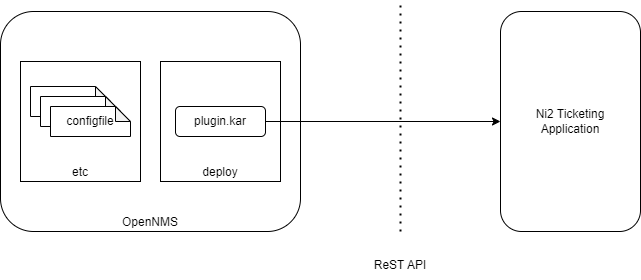
Ni2 provides a ReST api which the plugin uses to create and update tickets.
OSGi is a standard mechanism which OpenNMS uses to allow 'plugins' to be deployed and add functionality to a standard OpenNMS release.
The plugin is provided as a karaf .kar file (a kind of zip file) which is placed in the OpenNMS deploy directory. The corresponding configuration files for the plugin are placed in the OpenNMS etc directory. A full description of the installation and configuration options are provided later in this guide.
When the ticketing plugin is correctly installed and configured, additional options to manually create, update and close tickets are provided on the Alarm UI. Automated creation of tickets for new alarms is also possible and this is covered in the configuration section.
2.2. Manually creating a ticket
All current alarms are visible in the Alarms page of OpenNMS.
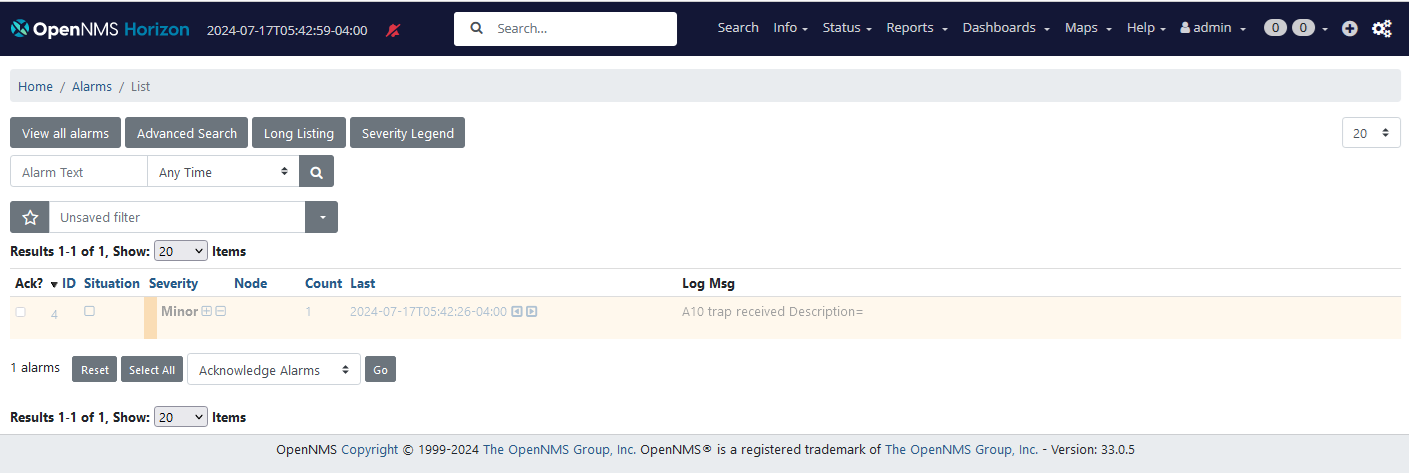
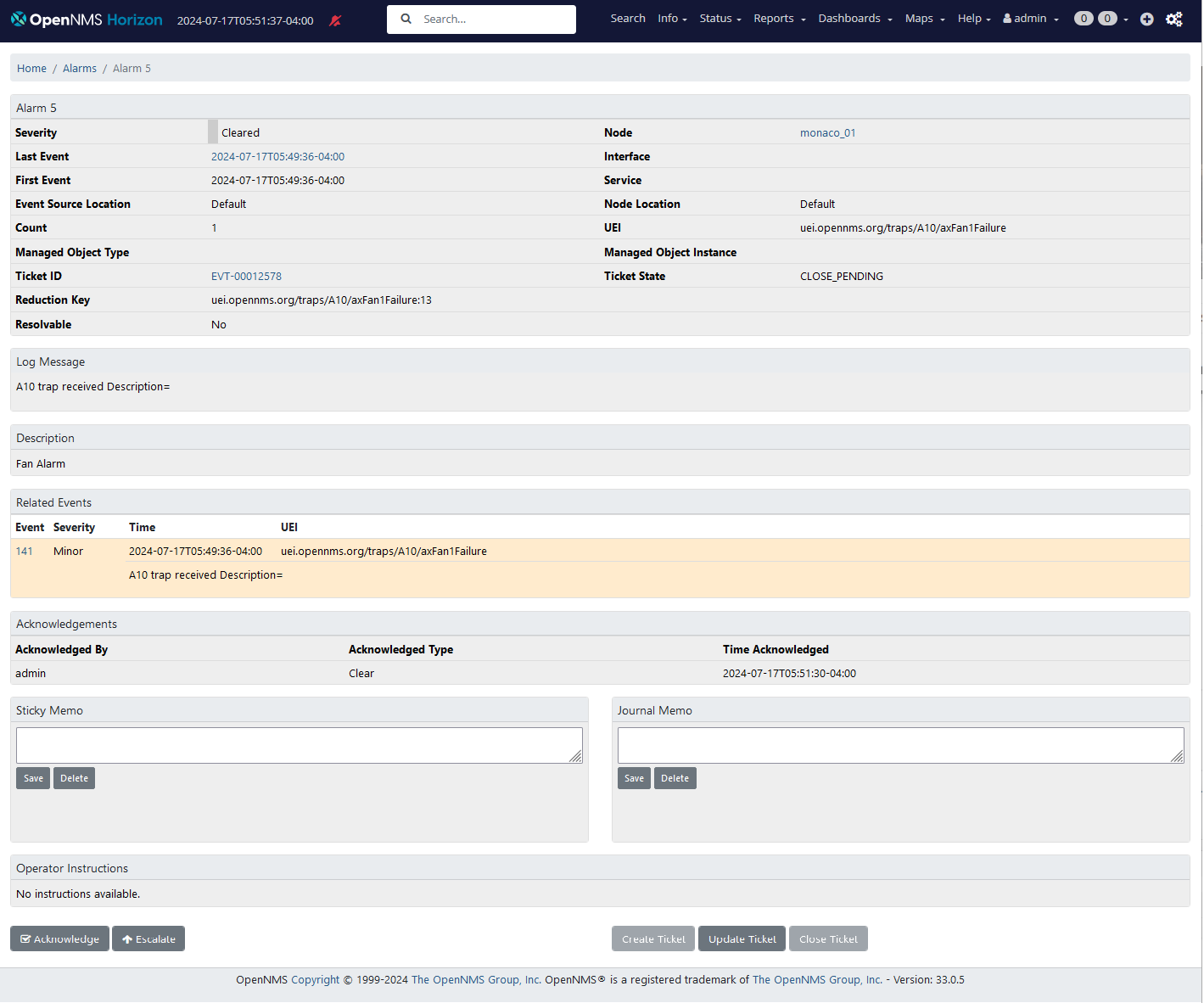
Selecting the ID of an alarm will take you to the alarm details page for that alarm. A new alarm with no associate ticket is illustrated below
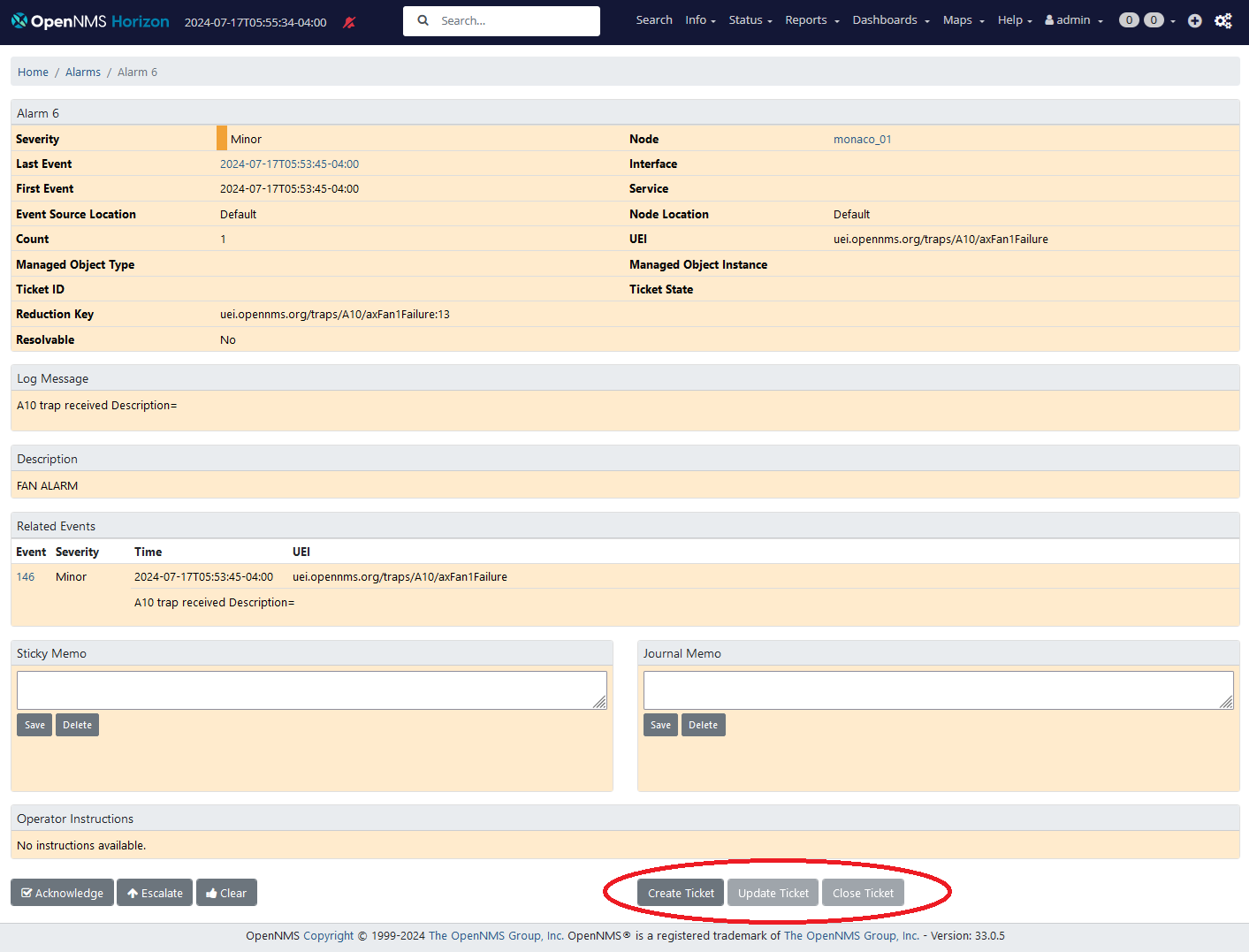
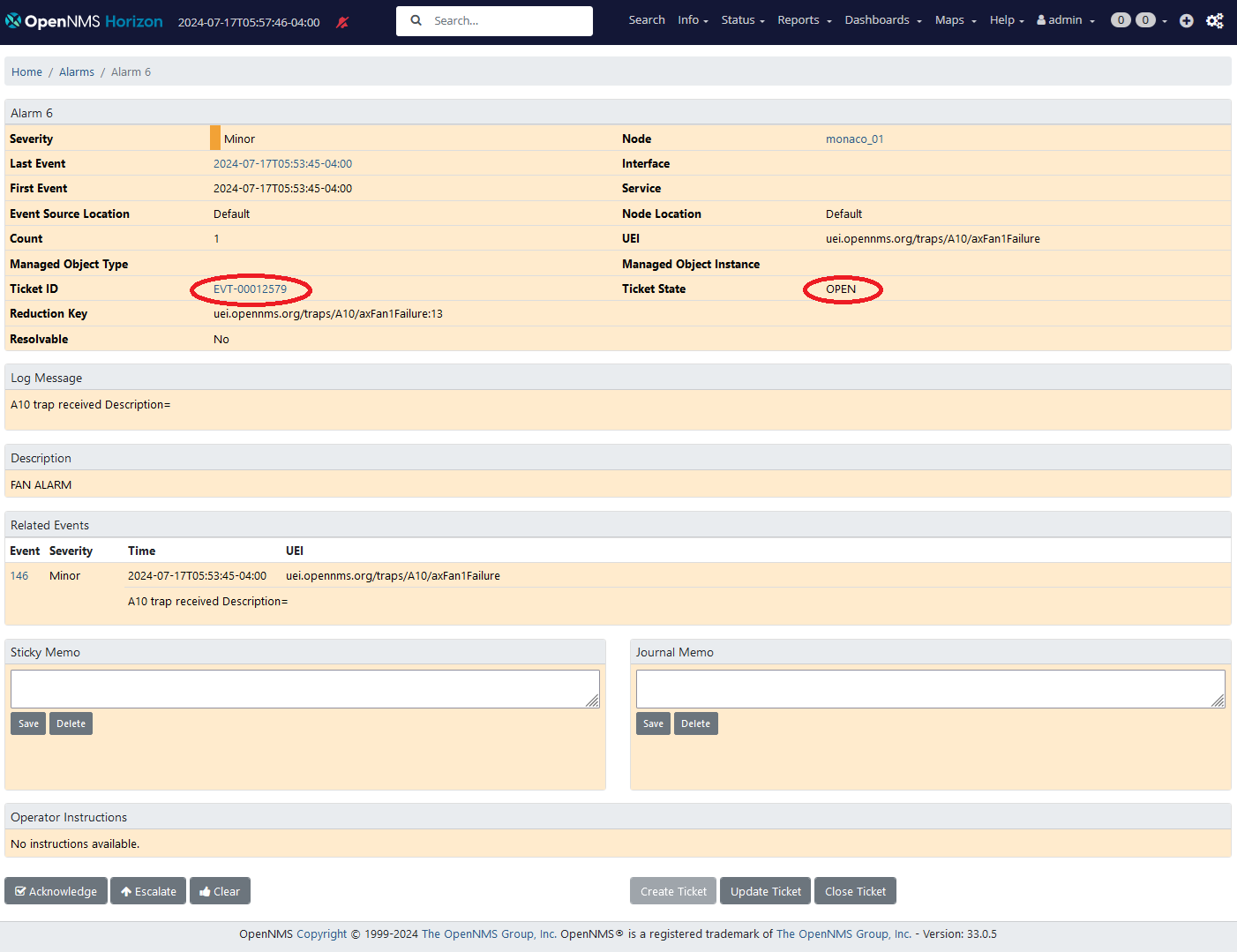
When the Create Ticket button is pressed, the ticket state changes to CREATE_PENDING, and if the create is successful, refreshing the alarm page will show the ticket as OPEN and a new reference link to the ticket will also be created.
Selecting this link will take you to the corresponding page for the ticket created in Ni2.
If the create was not successful, a CREATE_FAILED message will appear.
This can happen if the ReST API credentials are not set properly or if the Node Name associated with the alarm is not known as a resource id in the Ni2 system.
The configuration section will talk more about troubleshooting ticket creation issues.
The Update Ticket button requests the current state of an associated ticket in Ni2 (without changing its state).
The Close Ticket button can only be pressed if the associated alarm is already CLEARED.
It sets the state of the ticket in Ni2 to RESOLVED (Although this is reflected on the OpenNNS UI as CLOSED)
2.3. Ticket Lifecycle
OpenNMS has a very simple lifecycle for tickets.
Tickets associated with alarms can be in one of the following states: OPEN, CANCELLED, CLOSED. Alarms will only be deleted if the associated tickets are CANCELLED or CLOSED.
Ni2 has a richer lifecycle illustrated below
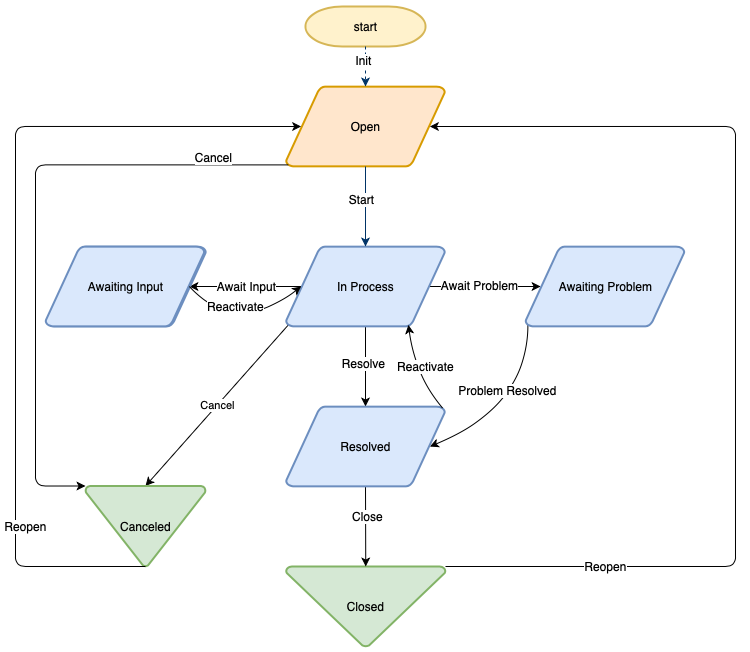
The mapping between Ni2 tickets and OpenNMS ticket states is as follows
| Ni2 Ticket Status | OpenNMS Ticket Status |
|---|---|
IN_PROCESS |
OPEN |
OPEN |
OPEN |
CLOSED |
CLOSED |
CANCELLED |
CANCELLED |
RESOLVED |
CLOSED |
any other Ni2 State |
OPEN |
The ticket state shown on the alarm UI reflects the current state of the Ni2 ticket and can be updated using the Update button.
OpenNMS can request the creation of new tickets but it can only set tickets into the resolved state if they have been set to the IN_PROCESS state by an Ni2 operator.
3. Ni2 OpenNMS Trouble Ticket Plugin Administration
3.1. Introduction
The internal architecture of OpenNMS ticketing is illustrated below.
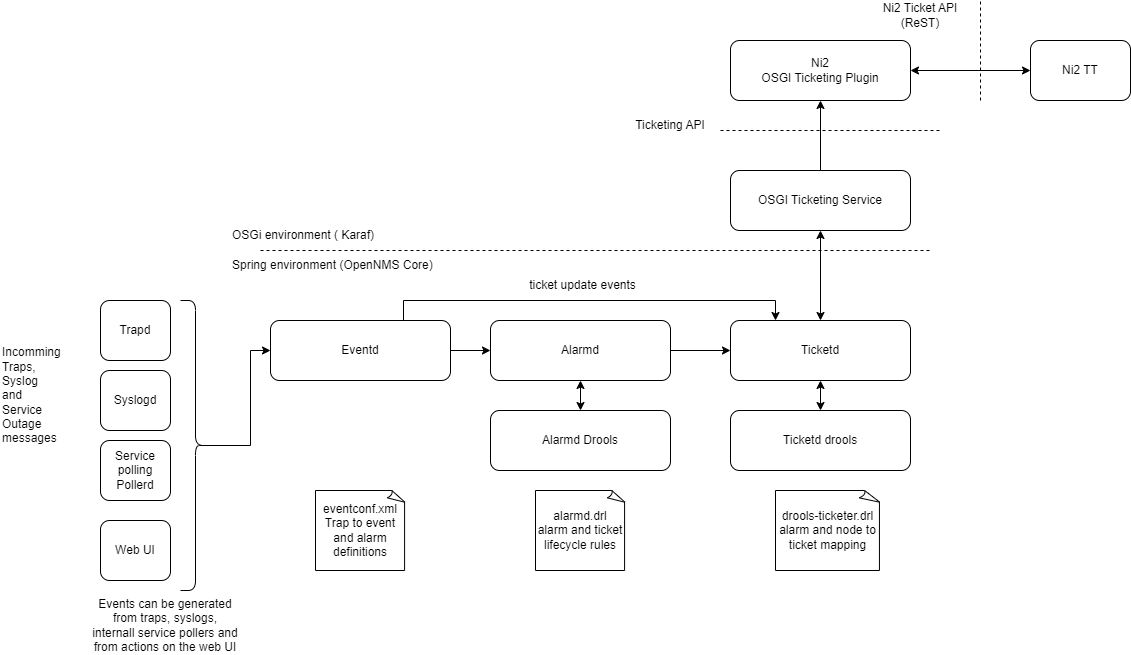
All of the processes within OpenNMS are gradually being migrated into OSGi but a number of features are still, for historical reasons, daemons running within the core. This includes a number of the ticketing interfaces developed before OSGi was introduced. You can see in this diagram that Eventd, Alarmd and Ticketd are mostly non-OSGi processes. The OSGI Ticketing Service bridges the Ticketd api into Karaf so that ticketing interfaces built as OSGi plugins can be found and used by the Ticketd daemon.
OpenNMS is an event driven application and Eventd provides an internal unified event bus through which all processes communicate inside OpenNMS core. Events can be derived from syslog messages sing syslogd or from SDMP traps using trapd. Internal OpenNMS events are also published by various service assurance processes such as pollerd.
eventconf.xml and its related include files in `/etc/events' are used to configure how traps and other events are mapped into alarms and what descriptive text is used to describe the event.
Alarmd listens for events which are configured to create or clear alarms. Jboss rules (Drools) is used to define the lifecycle of alarms. Once an event has created an alarm it is a candidate to map to a new trouble ticket and dules can also be used to determine when and how alarms might automatically create trouble tickets. The Alarmd rules files are contained in `etc/alarmd.drools.d' and example alarm ticket rules are contained in the alarm.drl file in this folder.
Ticketd provides a ticketing service which Alarmd uses to create tickets for alarms. It also listens for ticket create and update events which are created by users through the Alarm UI. The generic ticketing engine must be configured to use the correct api to talk to the correct ticket application.
Ticketd can be configured to use the in built ticketing interfaces or to use the OSGi ticketing service which allows it to find any ticketing plugin currently active in the system. Only one ticketing plugin can be used at a time so ensure only one is active otherwise the first one found will be used.
Ticketd can optionally use the DroolsTicketerServiceLayer which allow a drools rule file to define how alarm and node data are mapped into the ticket. We use this to refine the mapping of data into the Ni2 tickets.
The following sections will discuss how to install and configure the ticket plugin in more detail.
3.2. Installation
The OpenNMS OSGi ticketing integration provides a generic mechanism for linking OpenNMS Alarms to trouble tickets. A number of different ticketing integrations are provided and the newest integrations are provided as OSGi plugins. OSGi provides a flexible mechanism to install new features in OpenNMS without modifying the core code. The Ni2 Trouble Ticketing plugin is implemented as an OSGi feature.
The following figure illustrates the folder layout in an OpenNMS system (on a VM or in a container) and how this maps onto the docker-compose project provided as an example.
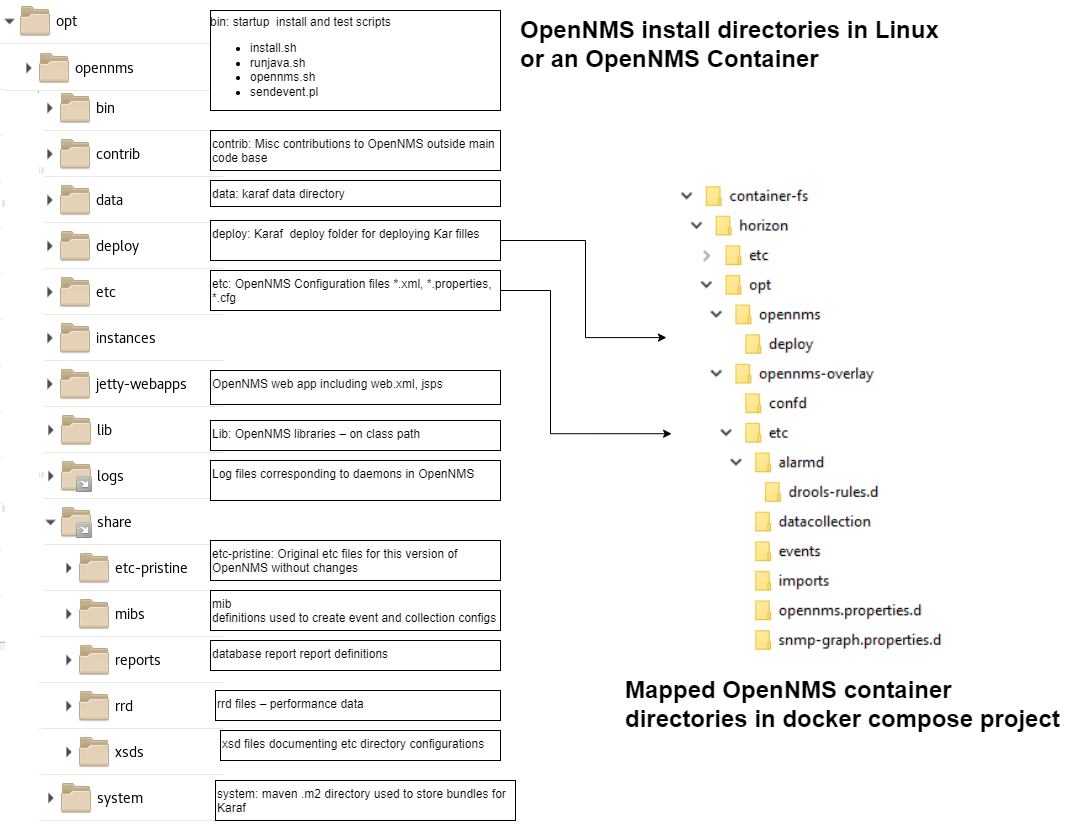
The plugin can be downloaded as a kar file from the releases section of the github repo https://github.com/gallenc/ni2-opennms-trouble-ticket-plugin/releases
This should be placed in the OpenNMS deploy folder.
The plugin will not become active until the following configuration steps are taken
3.3. Configuration
Note that an example configuration is provided in the minimal-minion-activemq docker compose project. You should copy and modify files from this project to create the configuration for your system. (This configuration is based on OpenNMS 32.0.5)
In order to install and enable the plugin changes need to be made in several places.
3.3.1. deploy ni2-tt-api-v1-kar-x.x.x.kar
Firstly you should download the ni2-tt-api-v1-kar-XXX.kar file (where XXX is the current version number) from the github folder
[ni2-opennms-trouble-ticket-plugin/releases](https://github.com/gallenc/ni2-opennms-trouble-ticket-plugin/releases)
Install this file in the karaf deploy directory -opennms-home-/deploy
To automatically enable the ni2 plugin on startup, modify -opennms-home-/etc/org.apache.karaf.features.cfg
Add ni2-ticketing to the end of the featuresBoot property but before opennms-karaf-health
featuresBoot = ( \
  ...
  scv-shell, \
  ni2-ticketing, \
  opennms-karaf-health
# Ensure that the 'opennms-karaf-health' feature is installed *last*
3.3.2. ni2 Plugin configuration
Ni2 properties file
The main properties for the ni2 plugin are held in -opennms-home-/etc/opennms.properties.d/ni2-troubleticket.properties which should not be checked into git since it contains sensitive passwords.
Instead copy/rename the template and change the values accordingly -opennms-home-/etc/opennms.properties.d/ni2-troubleticket.properties.template
# This file contains configuration properties for the Ni2 Trouble Ticket Plugin
#
# RENAME or copy this file to ni2-troubleticket.properties and change values appropriately
# DO NOT check passwords into git

# url of the Ni2 trouble ticket server
ni2.tt.server.url=http://localhost:8080

# username to access api
ni2.tt.server.username=username

# password to access api
ni2.tt.server.password=password

# client timeout (ms)
ni2.tt.opennms.clienttimeout=12000

# if true the client will trust all TLS/HTTPS certificates from server
ni2.tt.server.trustallcertificates=true

# identify of the OpenNMS system sending tickets to the server
ni2.tt.opennms.instance=OpenNMS1

# resource id to be used if not passed in ticket attributes from drools
ni2.tt.opennms.fallbackresource="set_fallback_resource";

# see OpenNMS documentation https://docs.opennms.com/horizon/33/operation/deep-dive/ticketing/introduction.html

# this tells the ticketing engine to look for an OSGi plugin exposing he ticketing interface.
# Only one OSGi ticketing plugin can be active at a time and the system will use the first one to be registered.
# (Ensure you only have one OSGi ticketing feature installed at a time)
opennms.ticketer.plugin=org.opennms.netmgt.ticketd.OSGiBasedTicketerPlugin

opennms.alarmTroubleTicketEnabled=true

# note this should be set up to get the url linking to the ticket on the web ui
opennms.alarmTroubleTicketLinkTemplate=http://localhost:8080/Ni2CMDBWebApi/overviewByCategoryAndAttribute/Event/UniversalId/${id}

# this sets up rules for mapping values in alarms and nodes to tickets
opennms.ticketer.servicelayer=org.opennms.netmgt.ticketd.DroolsTicketerServiceLayer

## note you must also set the rules file in  /etc/drools-ticketer.properties
## drools-ticketer.rules-file=/opt/opennms/etc/ni2-drools-ticketer-rules.drl
Most of the properties in the example file are self explanatory but some require extra mention below.
| property | description |
|---|---|
ni2.tt.opennms.instance |
This tells Ni2 which instance of OpenNMS raised the ticket. It should be combined with the alarm id to give a unique reference for the alarm. |
ni2.tt.opennms.fallbackresource |
Ni2 must have a resource which it recognises referenced in every ticket. However some alarms in OpenNMS will not have a resource<BR>In this case, the fallback resource will be used. (probably this shouldl just reference the OpenNMS system itself) |
opennms.alarmTroubleTicketLinkTemplate |
This is used to create a HREF link which will redirect the user to the Ni2 ticket. |
Note that the properties set in this file are used as default values when karaf CLI commands are issued to test ticket generation.
Ni2 OSGi Drools Ticketer mapping
The DroolsTicketerServiceLayer uses a set of drools rools to map OpenNMS Alarm and Node information into an OpenNMS ticket. The Ni2 plugin maps the OpenNMS ticktet to an ni2 trouble ticket.
The -opennms-home-/etc/drools-ticketer.properties file tells the DroolsTicketerServiceLayer where the drools rules file is stored
create a the file and add the following elements
#
# Drools Ticketer Configuration for ni2
#
drools-ticketer.rules-file=/opt/opennms/etc/ni2-drools-ticketer-rules.drl
```

Example rules are provided in

`-opennms-home-/etc/ni2-drools-ticketer-rules.drl`

```
package org.opennms.netmgt.ticketd;
import org.opennms.netmgt.model.OnmsAlarm;
import org.opennms.netmgt.model.OnmsNode;
import org.opennms.netmgt.model.OnmsCategory;
import org.opennms.api.integration.ticketing.Ticket;

import org.jsoup.Jsoup;
import org.jsoup.nodes.Document.OutputSettings;
import org.jsoup.safety.Whitelist;

dialect "mvel"

global Ticket ticket;

/*
 * Set tickets defaults
*/

rule "TicketDefaults"
salience 100
 when
  $alarm : OnmsAlarm()
  $node  : OnmsNode()

 then
  // note bug - must set ticket.alarmId as not set by service
  ticket.alarmId = $alarm.id

  ticket.summary = $alarm.logMsg

  // keeps html in alarm description
  // ticket.details = $alarm.description

  // removes html tags but preserves line feeds
  ticket.details = Jsoup.clean($alarm.description, "", Whitelist.none(), new OutputSettings().prettyPrint(false));

  ticket.addAttribute("ni2.tt.resourceids", $node.label);

  // use for more exact resource id using foreign source and foreign id.
  // ticket.addAttribute("ni2.tt.resourceids", $node.foreignSource:$node.foreignId);

end
You can see that ticket information is extracted from the alarm and node information.
In this example, we have simply mapped the alarm log message to the ticket.summary.
We have used Jsoup to remove all of the HTML tags from the alarm description and placed this in the ticket.details
OpennMS Tickets can contain an arbitrary number of attributes mapped as name value pairs.
These are mapped into ni2 tickets as follows
| OpenNMS Ticket Attribute name | Ni2 Ticket mapping |
|---|---|
ni2.tt.resourceids |
This should contain a comma separated list of Ni2 Resource ids to map to the ticket. The example just provides one resource, the node label. |
ni2.tt.attributes.XXX |
this will be mapped to an arbirary ni2 ticket custom attribte, with the name set to the value of the text after attributes. (i.e. the XXX characters) |
It is possible to add more rules which can process alarms into tickets differently depending on the data in the alarm or node objects.
For information, the objects referenced in drools are
| drools reference | OpenNMS object (on github) |
|---|---|
ticket |
|
$alarm |
|
$node |
logging ni2 plugin
Note that in these examples the DEBUG setting is useful for testing but INFO should be used for normal operation.
Logging happens in two places for the Ni2 plugin.
Firstly the generic OpenNMS ticketer code generates logs in -opennms-home-/logs/trouble-tickter.log
To see trouble-ticketer debug logs change -opennms-home-/etc/log4j2.xml adding a new routing appender and change trouble-ticketer from INFO to DEBUG
    <logger name="org.ni2.v01" additivity="false" level="DEBUG">
     <appender-ref ref="RoutingAppender"/>
    </logger>

    <!-- Allow any message to pass through the root logger -->
    <root level="DEBUG">
        ...
        <KeyValuePair key="trouble-ticketer"     value="DEBUG" />
        ...
Secondly the ni2 OSGi plugin generates logs in -opennms-home-/logs/karaf.log
However these logs can be directed to a separate file -opennms-home-/logs/ni2-ticketing-plugin.log by adding the following configuration to the end of -opennms-home-/etc/org.ops4j.pax.logging.cfg
# logger for ni2 plugins
log4j2.logger.ni2.name = org.ni2
log4j2.logger.ni2.level = DEBUG
log4j2.logger.ni2.additivity = true
log4j2.logger.ni2.appenderRef.Ni2PluginRollingFile.ref = Ni2PluginRollingFile

# Rolling file appender for ni2 plugins
log4j2.appender.plugin.type = RollingRandomAccessFile
log4j2.appender.plugin.name = Ni2PluginRollingFile
log4j2.appender.plugin.fileName = ${karaf.log}/ni2-ticketing-plugin.log
log4j2.appender.plugin.filePattern = ${karaf.log}/ni2-ticketing-plugin.log.%i
log4j2.appender.plugin.append = true
log4j2.appender.plugin.layout.type = PatternLayout
log4j2.appender.plugin.layout.pattern = ${log4j2.pattern}
log4j2.appender.plugin.policies.type = Policies
log4j2.appender.plugin.policies.size.type = SizeBasedTriggeringPolicy
log4j2.appender.plugin.policies.size.size = 16MB
3.4. Running and Testing the Plugin
Having made the changes above, start OpenNMS and wait for it to start up.
OpenNMS uses Karaf to manage it’s OSGi features.
Karaf has a CLI terminal which can be accessed using SSH.
ssh -p 8101 admin@localhost(You will need to supply the password for admin to login)
A full list of native karaf commands are available here: native Karaf 4 commands
A list of OpenNMS utility commands are documented here: OpenNMS Karaf cheat sheet
You can list any Kar files in the deploy directory
kar:list
KAR Name
ni2-tt-api-v1-kar-0.0.3-SNAPSHOT
You can also list the features available using
feature:listor to see the status of the ticketing plugin use
 feature:list | grep ni2-ticketing
ni2-ticketing | 0.0.3.SNAPSHOT        | x | Started     | ni2-ticketing-features | OpenNMS :: OPA :: Ticketing :: Ni2
The plugin can be installed automatically (as described above ) or manually from the terminal using
feature:install ni2-ticketingA number of commands are also provided to allow testing of the plugin
| command | details |
|---|---|
ni2-ticketing --help |
Lists help for commands |
ni2-ticketing:create-remote-ticket |
Create a new ticket in remote system. (Note - this does not link a ticket to an alarm in OpenNMS) |
ni2-ticketing:update-remote-ticket |
Update an existing ticket in remote system. |
ni2-ticketing:change-status |
Change status of a ticket |
ni2-ticketing:get-auth-token |
Get an authentication token |
ni2-ticketing:get-ticket |
Get a trouble ticket using a ticket id |
Example which gets an auth token using the default credentials
ni2-ticketing:get-auth-token
get-auth-token trying to get auth token serverUrl=https://demo-deck-apigtw.ni2.tech username=APIOpenNMS password not shown trustAllCertificates=true
received Authentication Token: eyJhbGciOiJIUzI1NiIsInR5cCI6IkpXVCJ9.eyJ1c2VybmFtZSI6IkFQSU9wZW5OTVMiLCJpYXQiOjE3MjEyMzA5MTR9.9t0SYbC3WQSUYN3cHii-nTV_9d2iEFKHGCy7I6FD3kg
Example which creates a remote ticket using the default credentials
ni2-ticketing:create-remote-ticket --description 'this is a short message' --longdescription 'this is a long message'
create-remote-ticket trying to create ticket. serverUrl=https://demo-deck-apigtw.ni2.tech username=APIOpenNMS password not shown trustAllCertificates=true
sending ticket request:TroubleTicketCreateRequest [getClassificationPath()=Event("Event/Support/Incident/Monitoring Incident"), getDescription()=this is a short message, getLongDescription()=this is a long message, getResourceIds()=[monaco_01], getCategory()=Network, getAlarmSource()=OpenNMS1, getAlarmId()=48278, getAlarmSeverity()=Minor, getAlarmStatus()=Unacknowledged]
success: response=TroubleTicketCreateResponse [universalId=EVT-00012580, url=/api/v1/entity/event/get/event/base/EVT-00012580]
4. Ni2 OpenNMS Trouble Ticket Plugin Developers Guide
Welcome to the Ni2 OpenNMS Trouble Ticket Plugin Developers Guide. This documentation provides information for developers of the Ni2 OpenNMS Trouble Ticket Plugin.
4.1. Introduction
THe figure below illustrates the relationship between the OpenNMS core and OSGi components running in Karaf
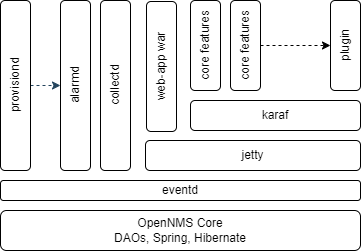
Historically, OpenNMS was developed as a pure Spring application using Hibernate to implement Data Access Objects (DAO’s) which synchronise with the PostgreSQL database.
Each of the core daemons are managed as JMX beans running within Spring on top of the JVM.
When minions were developed it was realised that there would be great benefit in moving OpenNMS to use Karaf as an OSGi container framework as this would allow the same OpenNMS modules to be distributed easily and also provide an 'out of the box' plugin mechanism. Karaf activates OSGi modules as karaf 'features' and the features internally use OSGi Blueprint instead of Spring manifests (although these are very similar).
New code and enhancements to OpenNMS including plugins are now usually created as Karaf features however a number of core daemons such as Jetty, Alarmd, Eventd, Provisiond and Collectd still run in Spring.
For this reason, Karaf currently runs on top of Jetty which allows Karaf features to access the core system. Over time all of he daemons will be migrated so that the whole of OpenNMS runs in Karaf and then Jetty is run as a karaf module instead of the other way around.
The Ni2 OpenNMS Trouble Ticket Plugin has been developed as an OSGi plugin which uses the https://github.com/OpenNMS/opennms-integration-apiOpenNMS Integration API to access the core OpenNMS services.
4.2. building the plugin
The source code for the plugin is held in github here https://github.com/gallenc/ni2-opennms-trouble-ticket-plugin
Once you have checked out the code, you can build the plugin using maven and (at least) Java 11 JDK.
cd ni2-tt-api-v1
mvn clean install
Once built, the plugin will be in a kar file in ni2-tt-api-v1/assembly/kar/target/ni2-tt-api-v1-kar-x.x.x-SNAPSHOT.kar
The build tests the plugin against a mock Ni2 API which is run in Jetty during the test phase.
A docker compose project is also provided in which the build will install the plugin kar. This project can be used to test the plugin in a test OpenNMS container either against the mock api or, with the right configuration, against a real Ni2 system.
4.3. Maven Modules
| folder | maven module name | details |
|---|---|---|
ni2-tt-api-v1 |
ni2-tt-api-v1 |
parent project |
model |
ni2-tt-api-v1-model |
Jackson model used to marshal and unmarshal the API. THe model is built first as it is used in the mock impl as well as the core code. |
jersey-mock-impl |
ni2-tt-api-v1-mock-impl |
Mock Ni2 test implementation which can run in Jetty. This can be run stand alone using 'mvn jetty:run'. |
core |
ni2-tt-api-v1-core |
The main code of the plugin including test code. The tests are run against the mock implementation |
karaf-features |
ni2-tt-api-v1-karaf-features |
Karaf features project used to generate the features file which defines the plugin and is also included in the kar file |
assembly |
ni2-tt-api-v1-assembly |
parent project of the assembly |
assembly/kar |
ni2-tt-api-v1-kar |
The plugin is built as a kar in the target folder. Note that the bundle dependencies not available in the core OpenNMS will also be package in the kar. |
minimal-minion-activemq |
ni2-tt-api-v1-minimal-minion-activemq |
This is a docker compose project which can be used to test and demonstrate the plugin |
documentation |
ni2-tt-api-v1-documentation |
This is the ascidoc documentation for the plugin. Docs are rendered as PDF and as HTML. The HTML files should be placed in the github docs branch so that they show up as a documentation page on github |
documentation/guide-admin |
ni2-tt-api-v1-guide-admin |
Admin Guide |